Showing posts with label jira. Show all posts

Thursday, February 28, 2019

Epics, Stories, Themes, and Initiatives

https://www.atlassian.com/agile/project-management/epics-stories-themes

Let’s say you and your team want to do something ambitious, like launch a rocket into space. To do so, you’ll need to structure your work: from the largest objectives down to the minute details. You’ll want to be able to respond to change, report your progress, and stick to a plan. Epics, stories, themes, and initiatives are precisely the tools you’ll need to do so.
By understanding how these popular agile methodologies help organize work, your team can strike a healthy balance between structure, flexibility, and launching rockets into space.

What are stories, epics, initiatives, and themes?

  • Stories, also called “user stories,” are short requirements or requests written from the perspective of an end user.
  • Epics are large bodies of work that can be broken down into a number of smaller tasks (called stories).
  • Initiatives are collections of epics that drive toward a common goal.
  • Themes are large focus areas that span the organization.
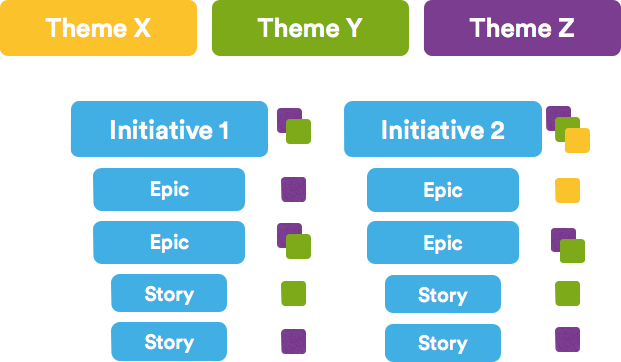
Agile epics vs stories vs themes | Atlassian Agile Coach

Agile Epic vs Story

In a sense, stories and epics in agile are similar to stories and epics in film or literature. A story is one simple narrative; a series of related and interdependent stories makes up an epic. The same is true for your work management, where the completion of related stories leads to the completion of an epic. The stories tell the arc of the work completed while the epic shares a high-level view of the unifying objective.
On an agile team, stories are something the team can commit to finish within a one or two-week sprint. Oftentimes, developers would work on dozens of stories a month. Epics, in contrast, are few in number and take longer to complete. Teams often have two or three epics they work to complete each quarter.
If your company was launching rockets into space, and wanted to improve the streaming service for your launches, you might structure your stories like the ones below.

Examples of an agile story:

  • iPhone users need access to a vertical view of the live feed when using the mobile app.
  • Desktop users need a “view fullscreen” button in the lower right hand corner of the video player.
  • Android users need to be linked to apple store.
The above stories are all related, and could all be considered individual tasks that drive toward the completion of a larger body of work (an epic). In this case, the epic might be “Improve Streaming Service for Q1 Launch.”
Organizing work into stories and epics also helps you and your team communicate effectively within the organization. If you were reporting your team’s progress to the Head of Engineering, you’d be speaking in epics. If you were talking to a colleague on your development team, you’d speak at the story level.

For complete definitions, examples and best practices, see:

Agile Epic vs Initiative

In the same way that epics are made up of stories, initiatives are made up of epics. Initiatives offer another level of organization above epics. In many cases, an initiative compiles epics from multiple teams to achieve a much broader, bigger goal than any of the epics themselves. While an epic is something you might complete in a month or a quarter, initiatives are often completed in multiple quarters to a year.
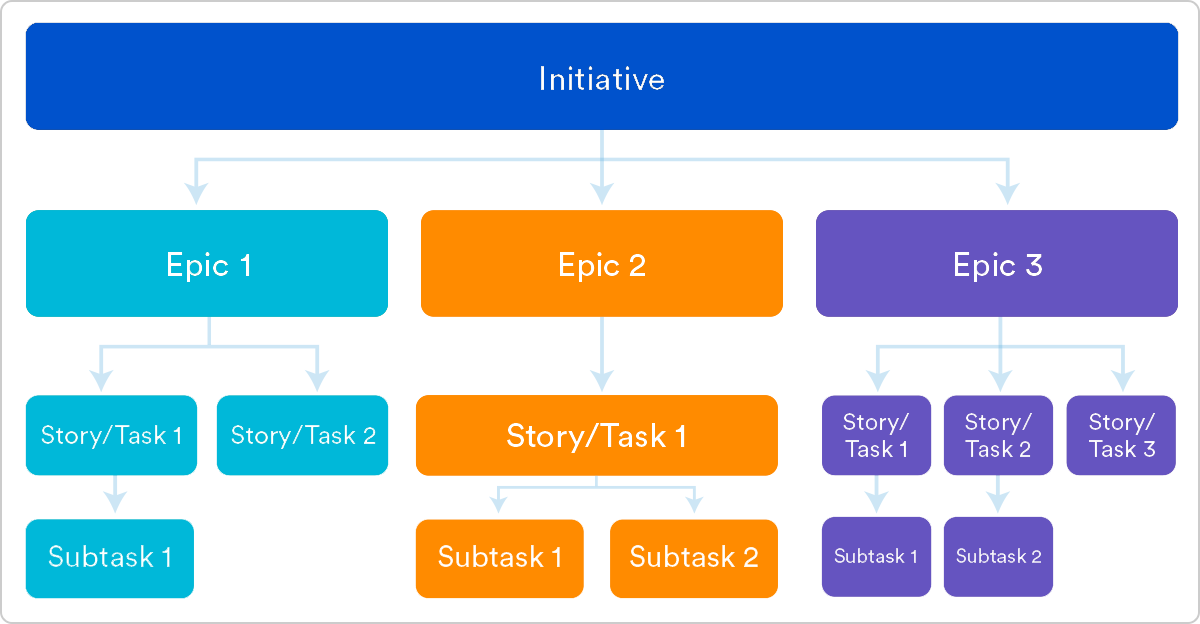
Example user stories | Atlassian agile coach
Example of epics in an initiative:
Let’s say your rocket ship company wants to decrease the cost per launch by 5% this year. That’s a great fit for an initiative, as no single epic could likely achieve that big of a goal. Within that initiative, there would be epics such as, “Decrease launch-phase fuel consumption by 1%,” “Increase launches per quarter from 3 to 4,” and “Turn all thermostats down from 71 to 69 degrees #Dadmode.”
At Atlassian:
Internally, we call our Initiatives “PC Tickets.” Project Central tickets are configured in Jira Software just like our epics. Each team takes their four or five most important goals for the year and makes PC tickets for each one. These PC tickets are used by the founders and management to understand all the work being done in the company.

Initiatives vs. Themes

In many organizations the founders and management team will encourage the pursuit of some aspirational destination. These are the (sometimes super corny) goals announced each year or quarter, and themes are how you keep track of them.
  • Initiatives are collections of epics
  • Themes are labels that track high-level organizational goals
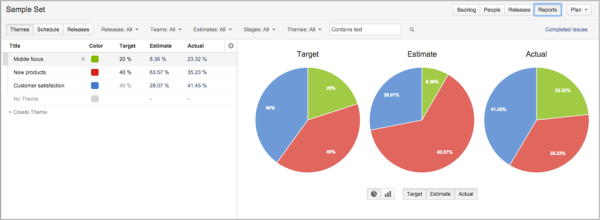
Initiatives have a structural design. They house epics, and the completion of those epics will lead to the completion of the initiative. Themes are an organizational tool that allows you to label backlog items, epics, and initiatives to understand what work contributes to what organizational goals. Themes should inspire the creation of epics and initiatives but don’t have a ridgid 1-to-1 relationship with them. A theme for a rocket ship company would be something like “Safety First.”
This is what themes look like in Portfolio for Jira:
Example of a sprint | Atlassian agile coach
At Atlassian:
One of our themes this year is Open Work. This is a push towards greater transparency, inside and outside of the company. My team is working towards this theme by doing a public retrospective on agile. We’re asking software developers to reflect on their agile development experience and tweet feedback with #RetroOnAgile. As a three month campaign, we’ve built an epic for this, and have labeled the epic with the Open Work theme.

Structuring your work:

Being agile and embracing structure are not mutually exclusive, and the structure laid out here is not one size fits all. Success is when you and your team understand these concepts and adapt them to your needs. For us, that's stories, epics, initatives, and themes. You can get started by learning how to set up Epics in Jira Software. 

Think globally, code locally: the secret to remote teams

Agile development was originally imagined for clustered teams, or teams physically located together in the same office. In keeping with the idea that "the most efficient and effective method of conveying information to and within a development team is face-to-face conversation", early agileteams were meant to work together in close proximity.
But today most businesses have a few–or several–distributed teams. This isn't just a trend; it makes good sense. Distributed teams can work on projects around the clock, and strong talent can be found in less competitive markets. (Not to mention, talent is easily retained by not requiring an undesired relocation.) But the benefits of distributed teams aren't without some trade-offs. For many distributed teams, it's difficult to adopt the agile practice of face-to-face interactions.
Other challenges that arise for distributed software teams:
  • Coordinating across time zones
  • Building rapport when everyone is not in the same office
  • Collaborating among different development cultures
  • Scheduling meetings or informal conversations when both teams are online at the same time for only a few hours (or less)
These are real problems. But not un-solvable ones. Let's walk through some strategies to help bridge the distance gap between local and remote offices, and ideas to help mitigate other potential issues as well.

How to structure global teams

Good software architecture dictates modular design, so structure your teams the same way. Every office should be self-sufficient in developing a single piece of technology, which minimizes the amount of collaboration required with teams in other time zones and makes them generally autonomous. When a project does require teams in different locations to pitch in, they can focus on their integration points and APIs.
Code reviews also play an important role. Since people are online at different times, distributing knowledge of the code between offices makes support and maintenance much easier. If a production issue emerges when the team is not online, another office can easily step in to support and resolve the issue, thanks to the know-how they gained from cross-team or cross-location code reviews.

Building rapport

It's important in any program, especially agile programs, to have solid rapport across the team. Personal connection builds trust, minimizes missed expectations, eases self-organization, and boosts morale. Within your office, take time getting to know everyone on your team. And, as much as possible, do the same with the people you work with in remote offices. Personal connections are important. The stronger they become, the greater the chance of seeing these colleagues as any other, rather than distant coworkers from unfamiliar places without good relationships.
PRO TIP:
At Atlassian, each new employee posts a "intro blog" on our internal Confluence instance, Atlassian's content collaboration tool. The blog introduces the new hire professionally as well as personally (hobbies, interests, family, etc.) which really helps bridge the gap between offices. The more we know each other as people, the stronger we are working together as teams. 
Above all, nothing replaces meeting face to face. Team members in each office will benefit from regular face time, and that includes video conferencing as well as visits to remote offices.
Video conferencing does a lot to bridge the gap between teams, especially for those distributed agile teams. However, teams that rely on video conferencing should be aware of certain limitations.
  • Video conferencing only allows for a very short window of communication, while working in the same office gives significant visibility into another's world: challenges, successes, and opportunities.
  • Network issues occur between offices that can make video and audio choppy or difficult to understand.
  • Most people still think of video conferencing as scheduled time. Creating a culture of using video chat for spontaneous casual conversation takes time.
To help mitigate some video conferencing issues, encourage team members to have weekly 1:1 video chat sessions. These can be less formal, and help facilitate knowledge sharing in a casual way. Teammates can use these opportunities to build rapport and work better together. 
Remember, tone, voice, and posture play a significant part in communication. In-person face time helps the team know their remote colleagues in higher fidelity, which, in turn, makes future video conferencing more effective.
Whether it's a house or a product, you need to define the vision and outline the strategic themes. Think of themes as organization-wide focus areas. What do you want to focus on over the next quarter, 6-months, year? Where do you want to spend time and resources? Performance, user experience, security, new competitive features (hot tub anyone?), or a combination of all these?
HOW WE DO IT:
Secondments are temporary assignments in a new job role or location, ranging anywhere from a few weeks to a year. They're not only an effective way to build rapport and spread culture across the team, but it is also a great way for employees to experience a different culture. 

Build a united development culture

There are four simple ways teams can make working across geographies easier and share a common developer culture:
  • Overcommunicate decisions across all geographies
  • Minimize the friction in setting up the development environment
  • Clearly define the definition of done
  • Create guidelines for filing effective bug reports
Let's break that down.
First, when moving from a co-located office to a distributed culture, communication becomes significantly harder. The first challenge is training the team to understand that, when decisions are made, they need to be communicated. Sounds like a no-brainer, but it's easy to forget! Often times important decisions are made in hallway conversations, informal local team meetings, or by individuals. Plus, it can be easy to dismiss small decisions as unimportant. 
Communicate even minute details until both offices find a healthy groove.
When decisions are made, everyone in each office needs to understand the decision and ideally why it was made. Don't use email. It's too easy to lose important information. Use a content management system like a wiki where team members can easily browse for updates across the team (and get notified of updates via email or their group chat tool). Delays caused by team members working on outdated information, hitting a roadblock, and then asking a question costs the team significantly more time than proactively sharing information.
Second, consistent development environments across the team make it easier to work together and track down issues. Spend the time creating a simple "Getting Started" guide and tame first-day friction by automating the setup as much as possible.
Third, when working between offices, clear standards around the definition of done makes it easier to manage expectations and build rapport across teams. A firm definition of done eliminates ambiguity in the work. For instance, when shipping a release that involves multiple teams, make it clear what it means to be "complete": code written, pull request created, code reviewed, tested, and merged into the appropriate branch.
And finally, distributing development means that not everyone is online when problems come up. Having clear guidelines for bug reports and troubleshooting how-tos makes it easier for anyone on the team to track down an issue. Code review and good automated tests also share knowledge about the code base and empowers the affected team to make the fix and validate that the change doesn't have any unexpected side effects. Thus, no team becomes a blocker. 

Maximize the golden hours

Every photographer knows "the golden hours" – just before and after sunrise and sunset–is the one of the most effective times to take great landscape photos. The golden hours for distributed software teams are when the local and remote teams are both in their respective offices at the same time. When all teams are in the office, this is a great time for stand-ups.
For teams that share work between time zones, stand-up is a great time to pass the baton so the team just coming online can pick up where the other team left off. And holding stand-up via video conference makes it easy to ask questions and get up to speed so everyone is off and running as soon as the meeting is done.
Sometimes offices are so far apart that meetings will cause some form of pain for one team. (Get up at 5am for stand-up with the other team? Umm... no thanks.) Rotate the meeting time so it's a shared burden, rather than continually subjecting the remote team to the odd hours–a sure-fire way to destroy morale. Closely monitor the entire team's engagement at stand-up. If there is undue strain, or the team is not getting a lot out of it, team members will begin to disengage and stop listening or sharing. And stand-up doesn't absolutely have to be a daily meeting. Meet with the remote team a few times a week and use the other days for a local stand-up. Similarly, stand-up doesn't have to be a morning routine, either. Whatever time of day is most convenient for everyone involved is the best time of day. 

Every team is distributed

In a distributed organization, the reality is that every team is remote. All teams need to adapt and learn how to share work between offices, communicate effectively, and grow a consistent culture across geographies. The most effective teams don't just make the remote office conform to the headquarter's culture because they understand that every office can learn something from the others. They seek to find and share successful practices across all locations. They also embrace "we" rather than an "us vs. them" culture.
Because another reality is that they become distributed from time to time. Business travel takes members outside of the office, and working at home occasionally can help employees better manage a work/life balance. Teams that embrace both structure and transparency scale more efficiently. When your project scales beyond your office, the culture will be set up to do the right thing naturally. 
https://www.atlassian.com/agile/teams/remote-teams