Showing posts with label scrum. Show all posts

Thursday, February 28, 2019

Epics, Stories, Themes, and Initiatives

https://www.atlassian.com/agile/project-management/epics-stories-themes

Let’s say you and your team want to do something ambitious, like launch a rocket into space. To do so, you’ll need to structure your work: from the largest objectives down to the minute details. You’ll want to be able to respond to change, report your progress, and stick to a plan. Epics, stories, themes, and initiatives are precisely the tools you’ll need to do so.
By understanding how these popular agile methodologies help organize work, your team can strike a healthy balance between structure, flexibility, and launching rockets into space.

What are stories, epics, initiatives, and themes?

  • Stories, also called “user stories,” are short requirements or requests written from the perspective of an end user.
  • Epics are large bodies of work that can be broken down into a number of smaller tasks (called stories).
  • Initiatives are collections of epics that drive toward a common goal.
  • Themes are large focus areas that span the organization.
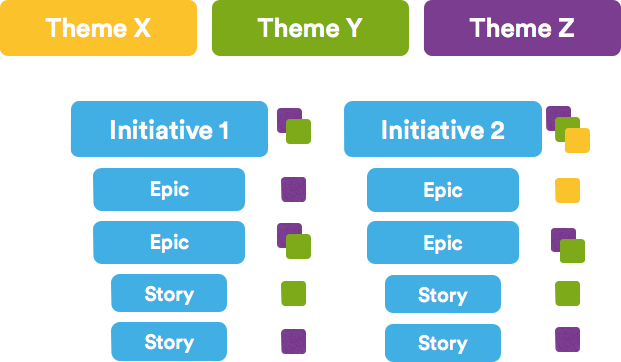
Agile epics vs stories vs themes | Atlassian Agile Coach

Agile Epic vs Story

In a sense, stories and epics in agile are similar to stories and epics in film or literature. A story is one simple narrative; a series of related and interdependent stories makes up an epic. The same is true for your work management, where the completion of related stories leads to the completion of an epic. The stories tell the arc of the work completed while the epic shares a high-level view of the unifying objective.
On an agile team, stories are something the team can commit to finish within a one or two-week sprint. Oftentimes, developers would work on dozens of stories a month. Epics, in contrast, are few in number and take longer to complete. Teams often have two or three epics they work to complete each quarter.
If your company was launching rockets into space, and wanted to improve the streaming service for your launches, you might structure your stories like the ones below.

Examples of an agile story:

  • iPhone users need access to a vertical view of the live feed when using the mobile app.
  • Desktop users need a “view fullscreen” button in the lower right hand corner of the video player.
  • Android users need to be linked to apple store.
The above stories are all related, and could all be considered individual tasks that drive toward the completion of a larger body of work (an epic). In this case, the epic might be “Improve Streaming Service for Q1 Launch.”
Organizing work into stories and epics also helps you and your team communicate effectively within the organization. If you were reporting your team’s progress to the Head of Engineering, you’d be speaking in epics. If you were talking to a colleague on your development team, you’d speak at the story level.

For complete definitions, examples and best practices, see:

Agile Epic vs Initiative

In the same way that epics are made up of stories, initiatives are made up of epics. Initiatives offer another level of organization above epics. In many cases, an initiative compiles epics from multiple teams to achieve a much broader, bigger goal than any of the epics themselves. While an epic is something you might complete in a month or a quarter, initiatives are often completed in multiple quarters to a year.
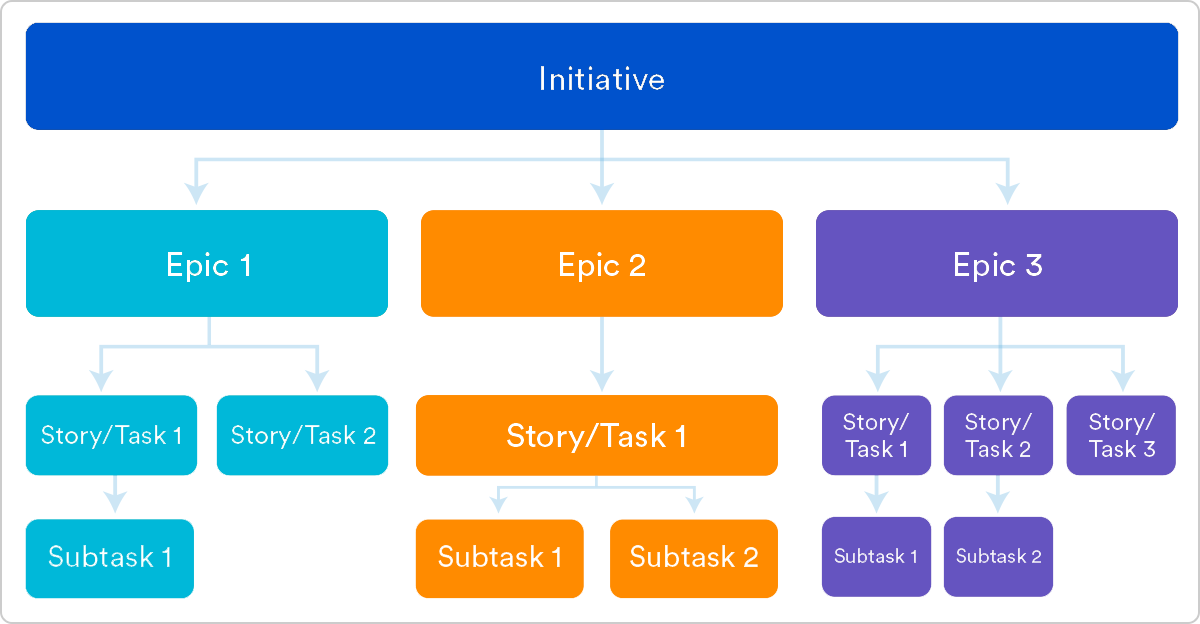
Example user stories | Atlassian agile coach
Example of epics in an initiative:
Let’s say your rocket ship company wants to decrease the cost per launch by 5% this year. That’s a great fit for an initiative, as no single epic could likely achieve that big of a goal. Within that initiative, there would be epics such as, “Decrease launch-phase fuel consumption by 1%,” “Increase launches per quarter from 3 to 4,” and “Turn all thermostats down from 71 to 69 degrees #Dadmode.”
At Atlassian:
Internally, we call our Initiatives “PC Tickets.” Project Central tickets are configured in Jira Software just like our epics. Each team takes their four or five most important goals for the year and makes PC tickets for each one. These PC tickets are used by the founders and management to understand all the work being done in the company.

Initiatives vs. Themes

In many organizations the founders and management team will encourage the pursuit of some aspirational destination. These are the (sometimes super corny) goals announced each year or quarter, and themes are how you keep track of them.
  • Initiatives are collections of epics
  • Themes are labels that track high-level organizational goals
Initiatives have a structural design. They house epics, and the completion of those epics will lead to the completion of the initiative. Themes are an organizational tool that allows you to label backlog items, epics, and initiatives to understand what work contributes to what organizational goals. Themes should inspire the creation of epics and initiatives but don’t have a ridgid 1-to-1 relationship with them. A theme for a rocket ship company would be something like “Safety First.”
This is what themes look like in Portfolio for Jira:
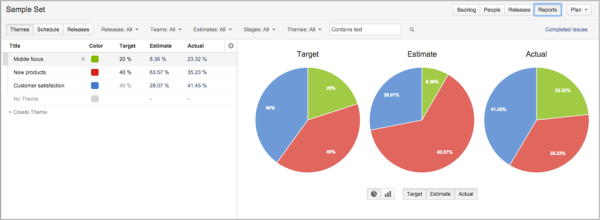
Example of a sprint | Atlassian agile coach
At Atlassian:
One of our themes this year is Open Work. This is a push towards greater transparency, inside and outside of the company. My team is working towards this theme by doing a public retrospective on agile. We’re asking software developers to reflect on their agile development experience and tweet feedback with #RetroOnAgile. As a three month campaign, we’ve built an epic for this, and have labeled the epic with the Open Work theme.

Structuring your work:

Being agile and embracing structure are not mutually exclusive, and the structure laid out here is not one size fits all. Success is when you and your team understand these concepts and adapt them to your needs. For us, that's stories, epics, initatives, and themes. You can get started by learning how to set up Epics in Jira Software. 

How detailed should tasks within a user story be for agile teams?

Whether splitting stories or creating tasks, the debate continues on many agile teams about the level of detail that should be included in a user story and associated tasks. Some people believe that the time spent during sprint planning meetings debating details and estimates would be better spent implementing. Others believe that not enough time is spent on details and estimates, leaving the team with a lack of clarity on what needs to be done during the sprint. To be the most efficient with their sprint planning and focus on having working software by the end of their sprint, agile teams need to go into just the right amount of detail.
Gartner Magic Quadrant for Software Test Automation

What are sprint tasks, and are they needed?

Sprint tasks are used by teams to decompose user stories or product backlog items (PBIs) at the sprint planning meeting to a more granular level. In scrum, planning and estimates become more detailed over time. At a high level, a project may start as epics, themes, or features, which are then broken down into user stories. Tasks are used to break down user stories even further. Tasks are the smallest unit used in scrum to track work. A task should be completed by one person on the team, though the team may choose to pair up when doing the work.
Typically, each user story will have multiple associated tasks. Sometimes these will be created by function, such as design, code, test, document, or UX. Some might say this sounds like waterfall, but using this approach on each story is acceptable and considered agile. Because the team is cross-functional, having tasks arranged in this manner allows team members to work in parallel on their area of functional expertise to complete the story as a team.
Likewise, some people feel that it's "anti-agile" to have "too many tasks" for each story and fear it will introduce overhead, such as estimating, monitoring, or tracking tasks. One option teams have that can minimize these processes is to create tasks, perhaps just with sticky notes on a physical task board.

What does the Scrum Guide say?

Though there's plenty of scrum literature that give recommendations and best practices associated with estimates, user stories, and task creation, the terms "user story" and "task" don't appear in the Scrum Guide by Ken Schwaber and Jeff Sutherland.
Regarding the sprint planning meeting, the guide says:
The work to be performed in the Sprint is planned at the Sprint Planning. This plan is created by the collaborative work of the entire Scrum Team. Sprint Planning is time-boxed to a maximum of eight hours for a one-month Sprint. For shorter Sprints, the event is usually shorter. The Scrum Master ensures that the event takes place and that attendants understand its purpose. The Scrum Master teaches the Scrum Team to keep it within the time-box. Sprint Planning answers the following:
• What can be delivered in the Increment resulting from the upcoming Sprint?
• How will the work needed to deliver the Increment be achieved?
The Scrum Guide doesn't suggest that tasks are required, and it doesn't recommend task size or a specific estimation process. It does suggest that refinement of product backlog with details and estimates is an ongoing process and "usually consumes no more than 10 percent of the capacity of the development team." So, while the Guide doesn't suggest how much detail should go into user stories or tasks, it does advise time-boxing the time spent in planning and refinement.

Tasks shouldn't take more than a day

There may be differences in opinion on estimation or other processes related to task management, but trying to keep the tasks small enough that they can be done in a day or less seems to be the generally accepted practice.
Although the Scrum Guide doesn't specifically refer to tasks, the guide says:
"Work planned for the first days of the Sprint by the Development Team is decomposed, often to units of one day or less."
There are several reasons that experts recommend this:
  • Daily tasks would match the cadence of the daily stand-up. By having tasks that take a day or less, progress (or lack thereof) is clear at the daily stand-up meeting.
  • Daily tasks increase the transparency of what everyone on the team is working on.
  • The team is able to inspect and adapt daily.
  • Limiting tasks to a day or less can help developers create flow, with focused, uninterrupted time.
That being said, there's no "rule" that tasks must be time-boxed to a day, and some teams may be finding success in not limiting the size of their tasks. The team should reflect on whether they're meeting the goals of the sprint and adjust accordingly.

The benefits of creating tasks

Regardless of the size of the tasks, at some point, typically the sprint planning meeting, the team needs to get any answers or clear up any assumptions they may have made regarding a user story. Up until this point, the user story may have only served as a placeholder for a "conversation," but as it nears the top of the prioritized backlog, the team needs to understand all the acceptance criteria and get a complete understanding of the definition of done.
Breaking the user story down into tasks helps the team determine how they'll approach the story. By getting into this level of detail, any unknowns will be uncovered. The team discusses edge cases and error conditions, getting answers from the product owner about expected results in various situations. Brainstorming in this way allows the team to collaborate on the best way to implement the story, which reduces miscommunication as the team discusses the best approach. The team may benefit from having a template with common types of tasks or things that need to be considered with each story.
Creating tasks helps clarify any unknowns that may lead to splitting the story or creating "spike tasks." Creating a spike task is described in Sprint Tasking Tips by Charles Bradley:
Essentially, create a task to remove the uncertainty around what the tasks should be. The way I usually coach this, there is the "spike task" which has some sort of estimate, and there is a "big bucket placeholder follow on task" which also has a rough estimate—usually larger, but not always. Then, the purpose of the spike task is simply to remove the uncertainty. Once the spike task is complete, the person or people who completed [it] can propose a set of "follow on tasks" to the Dev team, that will replace the placeholder tasks.
It's noted that spike tasks should be rare and are an indication that there may be a need for better backlog refinement.
Splitting stories is another option that can occur as a result of tasking. If you discover unknowns in the process of discussing a story and the tasks that will be needed to complete it, there may be the option of keeping the story simple and adding a second story for the next iteration. After completing the simpler story, the team may be better equipped to task and estimate the more complicated pieces.

What about estimates?

Though there's general agreement that tasks should be kept to a day or less, there are differing opinions about estimates, tracking, and monitoring tasks.
Some people feel that tasks should be estimated in hours and re-estimated daily, so the burndown chart shows a proper reflection of the status of the sprint. Arguments for this approach include the need for transparency, and the fact that daily updates reflected in the burndown chart would help provide visibility into times when the team might be at risk of not completing the stories on the sprint backlog.
The primary argument against estimates, tracking, and monitoring tasks is that these are micromanagement activities that create overhead. One way to get around this might be to get creative in minimizing processes that aren't adding value. One way teams are doing this is by "right-sizing" tasks into similar chunks of time, such as a day or half a day. Doing this is easier than estimating hours when things like interruptions, reading email, and meetings happen throughout the day.
Getting the right level of detail for the user stories and associated tasks during a sprint planning meeting can be a challenge. The team needs to have enough detail to implement the story, but they also need to be efficient in their sprint planning meeting. Creating tasks that take about a day or less is the most common practice. Though the team should avoid getting bogged down with unnecessary processes, discussing the approach and the tasks needed to complete the story will help the team reach a common understanding of what needs to be delivered at the end of the sprint. As the team gains experience and continues to inspect and adapt, they'll soon find that their stories and associated tasks will give them just the right amount of detail needed for a successful sprint.
https://techbeacon.com/app-dev-testing/how-detailed-should-tasks-within-user-story-be-agile-teams