Showing posts with label user story. Show all posts

Thursday, February 28, 2019

User stories are development tasks often expressed as “persona + need + purpose.”

It's tempting to think that user stories are, simply put, software system requirements. But they're not. 
A key component of agile software development is putting people first, and user-stories put actual end users at the center of the conversation. Stories use non-technical language to provide context for the development team and their efforts. After reading a user story, the team knows why they are building what they're building and what value it creates. 
User stories are one of the core components of an agile program. They help provide a user-focused framework for daily work — which drives collaboration, creativity, and a better product overall.

What Are Agile User Stories?

A user story is the smallest unit of work in an agile framework. It’s an end goal, not a feature, expressed from the software user’s perspective.
The purpose of a user story is articulate how a piece of work will deliver a particular value back to the customer. Note that "customers" don't have to be external end users in the traditional sense, they can also be internal customers or colleagues within your organization who depend on your team.
User stories are a few sentences in simple language that outline the desired outcome. They don't go into detail. Requirements are added later, once agreed upon by the team.
Stories fit neatly into agile frameworks like scrum and kanban. In scrum, user stories are added to sprints and “burned down” over the duration of the sprint. Kanban teams pull user stories into their backlog and run them through their workflow. It’s this work on user stories that help scrum teams get better at estimation and sprint planning, leading to more accurate forecasting and greater agility. Thanks to stories, kanban teams learn how to manage work-in-progress (WIP) and can further refine their workflows.
User stories are also the building blocks of larger agile frameworks like epics and initiatives. Epics are large work items broken down into a set of stories, and multiple epics comprise an initiative. These larger structures ensure that the day to day work of the development team (on stores) contributes to the organizational goals built into epics and initiatives.
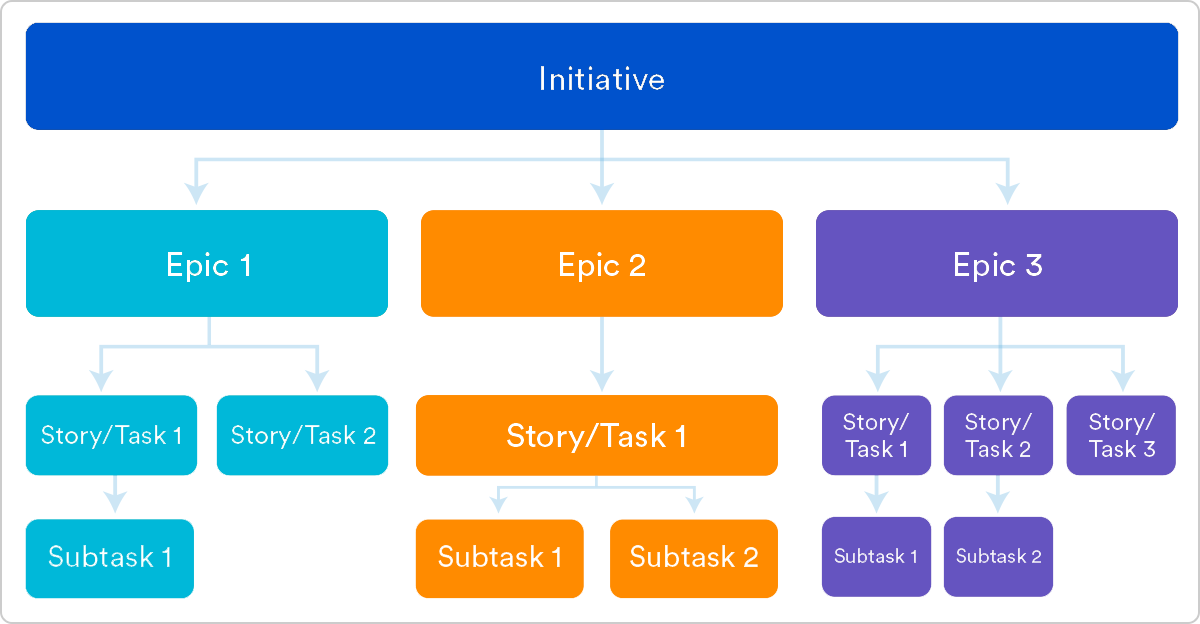
Agile epics vs stories vs themes | Atlassian Agile Coach

Why Create User Stories?

For development teams new to agile, user stories sometimes seem like an added step. Why not just break the big project (the epic) into a series of steps and get on with it? But stories give the team important context and associate tasks with the value those tasks bring.
User stories serve a number of key benefits:
  • Stories keep the focus on the user. A To Do list keeps the team focused on tasks that need checked off, but a collection of stories keeps the team focused on solving problems for real users.
     
  • Stories enable collaboration. With the end goal defined, the team can work together to decide how best to serve the user and meet that goal.
     
  • Stories drive creative solutions. Stories encourage the team to think critically and creatively about how to best solve for an end goal.
     
  • Stories create momentum. With each passing story the development team enjoys a small challenges and a small win, driving momentum.  

Working with User Stories

Once a story has been written, it’s time to integrate it into your workflow. Generally a story is written by the product owner, product manager, or program manager and submitted for review.
During a sprint or iteration planning meeting, the team decides what stories they’ll tackle that sprint. Teams now discuss the requirements and functionality that each user story requires. This is an opportunity to get technical and creative in the team’s implementation of the story. Once agreed upon, these requirements are added to the story.
Another common step in this meeting is to score the stories based on their complexity or time to completion. Teams use t-shirt sizes, the Fibonacci sequence, or planning poker to make proper estimations. A story should be sized to complete in one sprint, so as the team specs each story, they make sure to break up stories that will go over that completion horizon.  

How to Write User Stories

Consider the following when writing user stories:
  • Definition of “Done” — The story is generally “done” when the user can complete the outlined task, but make sure to define what that is.
     
  • Outline subtasks or tasks — Decide which specific steps need to be completed and who is responsible for each of them.
     
  • User personas — For Whom? If there are multiple end users, consider making multiple stories.
     
  • Ordered Steps — Write a story for each step in a larger process.
     
  • Listen to feedback — Talk to your users and capture the problem or need in their words. No need to guess at stories when you can source them from your customers.
     
  • Time — Time is a touchy subject. Many development teams avoid discussions of time altogether, relying instead on their estimation frameworks. Since stories should be completable in one sprint, stories that might take weeks or months to complete should be broken up into smaller stories or should be considered their own epic.
     
Once the user stories are clearly defined, make sure they are visible for the entire team.

User Story Template and Examples

User stories are often expressed in a simple sentence, structured as follows:
“As a [persona], I [want to], [so that].”
Breaking this down: 
  • "As a [persona]": Who are we building this for? We’re not just after a job title, we’re after the persona of the person. Max. Our team should have a shared understanding of who Max is. We’ve hopefully interviewed plenty of Max’s. We understand how that person works, how they think and what they feel. We have empathy for Max.
  • “Wants to”: Here we’re describing their intent — not the features they use. What is it they’re actually trying to achieve? This statement should be implementation free — if you’re describing any part of the UI and not what the user goal is you're missing the point.
  • “So that”: how does their immediate desire to do something this fit into their bigger picture? What’s the overall benefit they’re trying to achieve? What is the big problem that needs solving?
For example, user stories might look like:
  • As Max, I want to invite my friends, so we can enjoy this service together.
  • As Sascha, I want to organize my work, so I can feel more in control. 
  • As a manager, I want to be able to understand my colleagues progress, so I can better report our sucess and failures. 
This structure is not required, but it is helpful for defining done. When that persona can capture their desired value, then the story is complete. We encourage teams to define their own structure, and then to stick to it.

Getting Started with Agile User Stories

User stories describe the why and the what behind the day-to-day work of development team members, often expressed as persona + need + purpose. Understanding their role as the source of truth for what your team is delivering, but also why, is key to a smooth process.
Start by evaluating the next, or most pressing, large project (e.g. an epic). Break it down into smaller user stories, and work with the development team for refinement. Once your stories are out in the wild where the whole team can see them, you’re ready to get to work.

https://www.atlassian.com/agile/project-management/user-stories

How detailed should tasks within a user story be for agile teams?

Whether splitting stories or creating tasks, the debate continues on many agile teams about the level of detail that should be included in a user story and associated tasks. Some people believe that the time spent during sprint planning meetings debating details and estimates would be better spent implementing. Others believe that not enough time is spent on details and estimates, leaving the team with a lack of clarity on what needs to be done during the sprint. To be the most efficient with their sprint planning and focus on having working software by the end of their sprint, agile teams need to go into just the right amount of detail.
Gartner Magic Quadrant for Software Test Automation

What are sprint tasks, and are they needed?

Sprint tasks are used by teams to decompose user stories or product backlog items (PBIs) at the sprint planning meeting to a more granular level. In scrum, planning and estimates become more detailed over time. At a high level, a project may start as epics, themes, or features, which are then broken down into user stories. Tasks are used to break down user stories even further. Tasks are the smallest unit used in scrum to track work. A task should be completed by one person on the team, though the team may choose to pair up when doing the work.
Typically, each user story will have multiple associated tasks. Sometimes these will be created by function, such as design, code, test, document, or UX. Some might say this sounds like waterfall, but using this approach on each story is acceptable and considered agile. Because the team is cross-functional, having tasks arranged in this manner allows team members to work in parallel on their area of functional expertise to complete the story as a team.
Likewise, some people feel that it's "anti-agile" to have "too many tasks" for each story and fear it will introduce overhead, such as estimating, monitoring, or tracking tasks. One option teams have that can minimize these processes is to create tasks, perhaps just with sticky notes on a physical task board.

What does the Scrum Guide say?

Though there's plenty of scrum literature that give recommendations and best practices associated with estimates, user stories, and task creation, the terms "user story" and "task" don't appear in the Scrum Guide by Ken Schwaber and Jeff Sutherland.
Regarding the sprint planning meeting, the guide says:
The work to be performed in the Sprint is planned at the Sprint Planning. This plan is created by the collaborative work of the entire Scrum Team. Sprint Planning is time-boxed to a maximum of eight hours for a one-month Sprint. For shorter Sprints, the event is usually shorter. The Scrum Master ensures that the event takes place and that attendants understand its purpose. The Scrum Master teaches the Scrum Team to keep it within the time-box. Sprint Planning answers the following:
• What can be delivered in the Increment resulting from the upcoming Sprint?
• How will the work needed to deliver the Increment be achieved?
The Scrum Guide doesn't suggest that tasks are required, and it doesn't recommend task size or a specific estimation process. It does suggest that refinement of product backlog with details and estimates is an ongoing process and "usually consumes no more than 10 percent of the capacity of the development team." So, while the Guide doesn't suggest how much detail should go into user stories or tasks, it does advise time-boxing the time spent in planning and refinement.

Tasks shouldn't take more than a day

There may be differences in opinion on estimation or other processes related to task management, but trying to keep the tasks small enough that they can be done in a day or less seems to be the generally accepted practice.
Although the Scrum Guide doesn't specifically refer to tasks, the guide says:
"Work planned for the first days of the Sprint by the Development Team is decomposed, often to units of one day or less."
There are several reasons that experts recommend this:
  • Daily tasks would match the cadence of the daily stand-up. By having tasks that take a day or less, progress (or lack thereof) is clear at the daily stand-up meeting.
  • Daily tasks increase the transparency of what everyone on the team is working on.
  • The team is able to inspect and adapt daily.
  • Limiting tasks to a day or less can help developers create flow, with focused, uninterrupted time.
That being said, there's no "rule" that tasks must be time-boxed to a day, and some teams may be finding success in not limiting the size of their tasks. The team should reflect on whether they're meeting the goals of the sprint and adjust accordingly.

The benefits of creating tasks

Regardless of the size of the tasks, at some point, typically the sprint planning meeting, the team needs to get any answers or clear up any assumptions they may have made regarding a user story. Up until this point, the user story may have only served as a placeholder for a "conversation," but as it nears the top of the prioritized backlog, the team needs to understand all the acceptance criteria and get a complete understanding of the definition of done.
Breaking the user story down into tasks helps the team determine how they'll approach the story. By getting into this level of detail, any unknowns will be uncovered. The team discusses edge cases and error conditions, getting answers from the product owner about expected results in various situations. Brainstorming in this way allows the team to collaborate on the best way to implement the story, which reduces miscommunication as the team discusses the best approach. The team may benefit from having a template with common types of tasks or things that need to be considered with each story.
Creating tasks helps clarify any unknowns that may lead to splitting the story or creating "spike tasks." Creating a spike task is described in Sprint Tasking Tips by Charles Bradley:
Essentially, create a task to remove the uncertainty around what the tasks should be. The way I usually coach this, there is the "spike task" which has some sort of estimate, and there is a "big bucket placeholder follow on task" which also has a rough estimate—usually larger, but not always. Then, the purpose of the spike task is simply to remove the uncertainty. Once the spike task is complete, the person or people who completed [it] can propose a set of "follow on tasks" to the Dev team, that will replace the placeholder tasks.
It's noted that spike tasks should be rare and are an indication that there may be a need for better backlog refinement.
Splitting stories is another option that can occur as a result of tasking. If you discover unknowns in the process of discussing a story and the tasks that will be needed to complete it, there may be the option of keeping the story simple and adding a second story for the next iteration. After completing the simpler story, the team may be better equipped to task and estimate the more complicated pieces.

What about estimates?

Though there's general agreement that tasks should be kept to a day or less, there are differing opinions about estimates, tracking, and monitoring tasks.
Some people feel that tasks should be estimated in hours and re-estimated daily, so the burndown chart shows a proper reflection of the status of the sprint. Arguments for this approach include the need for transparency, and the fact that daily updates reflected in the burndown chart would help provide visibility into times when the team might be at risk of not completing the stories on the sprint backlog.
The primary argument against estimates, tracking, and monitoring tasks is that these are micromanagement activities that create overhead. One way to get around this might be to get creative in minimizing processes that aren't adding value. One way teams are doing this is by "right-sizing" tasks into similar chunks of time, such as a day or half a day. Doing this is easier than estimating hours when things like interruptions, reading email, and meetings happen throughout the day.
Getting the right level of detail for the user stories and associated tasks during a sprint planning meeting can be a challenge. The team needs to have enough detail to implement the story, but they also need to be efficient in their sprint planning meeting. Creating tasks that take about a day or less is the most common practice. Though the team should avoid getting bogged down with unnecessary processes, discussing the approach and the tasks needed to complete the story will help the team reach a common understanding of what needs to be delivered at the end of the sprint. As the team gains experience and continues to inspect and adapt, they'll soon find that their stories and associated tasks will give them just the right amount of detail needed for a successful sprint.
https://techbeacon.com/app-dev-testing/how-detailed-should-tasks-within-user-story-be-agile-teams