Thursday, February 28, 2019

How detailed should tasks within a user story be for agile teams?

Whether splitting stories or creating tasks, the debate continues on many agile teams about the level of detail that should be included in a user story and associated tasks. Some people believe that the time spent during sprint planning meetings debating details and estimates would be better spent implementing. Others believe that not enough time is spent on details and estimates, leaving the team with a lack of clarity on what needs to be done during the sprint. To be the most efficient with their sprint planning and focus on having working software by the end of their sprint, agile teams need to go into just the right amount of detail.
Gartner Magic Quadrant for Software Test Automation

What are sprint tasks, and are they needed?

Sprint tasks are used by teams to decompose user stories or product backlog items (PBIs) at the sprint planning meeting to a more granular level. In scrum, planning and estimates become more detailed over time. At a high level, a project may start as epics, themes, or features, which are then broken down into user stories. Tasks are used to break down user stories even further. Tasks are the smallest unit used in scrum to track work. A task should be completed by one person on the team, though the team may choose to pair up when doing the work.
Typically, each user story will have multiple associated tasks. Sometimes these will be created by function, such as design, code, test, document, or UX. Some might say this sounds like waterfall, but using this approach on each story is acceptable and considered agile. Because the team is cross-functional, having tasks arranged in this manner allows team members to work in parallel on their area of functional expertise to complete the story as a team.
Likewise, some people feel that it's "anti-agile" to have "too many tasks" for each story and fear it will introduce overhead, such as estimating, monitoring, or tracking tasks. One option teams have that can minimize these processes is to create tasks, perhaps just with sticky notes on a physical task board.

What does the Scrum Guide say?

Though there's plenty of scrum literature that give recommendations and best practices associated with estimates, user stories, and task creation, the terms "user story" and "task" don't appear in the Scrum Guide by Ken Schwaber and Jeff Sutherland.
Regarding the sprint planning meeting, the guide says:
The work to be performed in the Sprint is planned at the Sprint Planning. This plan is created by the collaborative work of the entire Scrum Team. Sprint Planning is time-boxed to a maximum of eight hours for a one-month Sprint. For shorter Sprints, the event is usually shorter. The Scrum Master ensures that the event takes place and that attendants understand its purpose. The Scrum Master teaches the Scrum Team to keep it within the time-box. Sprint Planning answers the following:
• What can be delivered in the Increment resulting from the upcoming Sprint?
• How will the work needed to deliver the Increment be achieved?
The Scrum Guide doesn't suggest that tasks are required, and it doesn't recommend task size or a specific estimation process. It does suggest that refinement of product backlog with details and estimates is an ongoing process and "usually consumes no more than 10 percent of the capacity of the development team." So, while the Guide doesn't suggest how much detail should go into user stories or tasks, it does advise time-boxing the time spent in planning and refinement.

Tasks shouldn't take more than a day

There may be differences in opinion on estimation or other processes related to task management, but trying to keep the tasks small enough that they can be done in a day or less seems to be the generally accepted practice.
Although the Scrum Guide doesn't specifically refer to tasks, the guide says:
"Work planned for the first days of the Sprint by the Development Team is decomposed, often to units of one day or less."
There are several reasons that experts recommend this:
  • Daily tasks would match the cadence of the daily stand-up. By having tasks that take a day or less, progress (or lack thereof) is clear at the daily stand-up meeting.
  • Daily tasks increase the transparency of what everyone on the team is working on.
  • The team is able to inspect and adapt daily.
  • Limiting tasks to a day or less can help developers create flow, with focused, uninterrupted time.
That being said, there's no "rule" that tasks must be time-boxed to a day, and some teams may be finding success in not limiting the size of their tasks. The team should reflect on whether they're meeting the goals of the sprint and adjust accordingly.

The benefits of creating tasks

Regardless of the size of the tasks, at some point, typically the sprint planning meeting, the team needs to get any answers or clear up any assumptions they may have made regarding a user story. Up until this point, the user story may have only served as a placeholder for a "conversation," but as it nears the top of the prioritized backlog, the team needs to understand all the acceptance criteria and get a complete understanding of the definition of done.
Breaking the user story down into tasks helps the team determine how they'll approach the story. By getting into this level of detail, any unknowns will be uncovered. The team discusses edge cases and error conditions, getting answers from the product owner about expected results in various situations. Brainstorming in this way allows the team to collaborate on the best way to implement the story, which reduces miscommunication as the team discusses the best approach. The team may benefit from having a template with common types of tasks or things that need to be considered with each story.
Creating tasks helps clarify any unknowns that may lead to splitting the story or creating "spike tasks." Creating a spike task is described in Sprint Tasking Tips by Charles Bradley:
Essentially, create a task to remove the uncertainty around what the tasks should be. The way I usually coach this, there is the "spike task" which has some sort of estimate, and there is a "big bucket placeholder follow on task" which also has a rough estimate—usually larger, but not always. Then, the purpose of the spike task is simply to remove the uncertainty. Once the spike task is complete, the person or people who completed [it] can propose a set of "follow on tasks" to the Dev team, that will replace the placeholder tasks.
It's noted that spike tasks should be rare and are an indication that there may be a need for better backlog refinement.
Splitting stories is another option that can occur as a result of tasking. If you discover unknowns in the process of discussing a story and the tasks that will be needed to complete it, there may be the option of keeping the story simple and adding a second story for the next iteration. After completing the simpler story, the team may be better equipped to task and estimate the more complicated pieces.

What about estimates?

Though there's general agreement that tasks should be kept to a day or less, there are differing opinions about estimates, tracking, and monitoring tasks.
Some people feel that tasks should be estimated in hours and re-estimated daily, so the burndown chart shows a proper reflection of the status of the sprint. Arguments for this approach include the need for transparency, and the fact that daily updates reflected in the burndown chart would help provide visibility into times when the team might be at risk of not completing the stories on the sprint backlog.
The primary argument against estimates, tracking, and monitoring tasks is that these are micromanagement activities that create overhead. One way to get around this might be to get creative in minimizing processes that aren't adding value. One way teams are doing this is by "right-sizing" tasks into similar chunks of time, such as a day or half a day. Doing this is easier than estimating hours when things like interruptions, reading email, and meetings happen throughout the day.
Getting the right level of detail for the user stories and associated tasks during a sprint planning meeting can be a challenge. The team needs to have enough detail to implement the story, but they also need to be efficient in their sprint planning meeting. Creating tasks that take about a day or less is the most common practice. Though the team should avoid getting bogged down with unnecessary processes, discussing the approach and the tasks needed to complete the story will help the team reach a common understanding of what needs to be delivered at the end of the sprint. As the team gains experience and continues to inspect and adapt, they'll soon find that their stories and associated tasks will give them just the right amount of detail needed for a successful sprint.
https://techbeacon.com/app-dev-testing/how-detailed-should-tasks-within-user-story-be-agile-teams

Think globally, code locally: the secret to remote teams

Agile development was originally imagined for clustered teams, or teams physically located together in the same office. In keeping with the idea that "the most efficient and effective method of conveying information to and within a development team is face-to-face conversation", early agileteams were meant to work together in close proximity.
But today most businesses have a few–or several–distributed teams. This isn't just a trend; it makes good sense. Distributed teams can work on projects around the clock, and strong talent can be found in less competitive markets. (Not to mention, talent is easily retained by not requiring an undesired relocation.) But the benefits of distributed teams aren't without some trade-offs. For many distributed teams, it's difficult to adopt the agile practice of face-to-face interactions.
Other challenges that arise for distributed software teams:
  • Coordinating across time zones
  • Building rapport when everyone is not in the same office
  • Collaborating among different development cultures
  • Scheduling meetings or informal conversations when both teams are online at the same time for only a few hours (or less)
These are real problems. But not un-solvable ones. Let's walk through some strategies to help bridge the distance gap between local and remote offices, and ideas to help mitigate other potential issues as well.

How to structure global teams

Good software architecture dictates modular design, so structure your teams the same way. Every office should be self-sufficient in developing a single piece of technology, which minimizes the amount of collaboration required with teams in other time zones and makes them generally autonomous. When a project does require teams in different locations to pitch in, they can focus on their integration points and APIs.
Code reviews also play an important role. Since people are online at different times, distributing knowledge of the code between offices makes support and maintenance much easier. If a production issue emerges when the team is not online, another office can easily step in to support and resolve the issue, thanks to the know-how they gained from cross-team or cross-location code reviews.

Building rapport

It's important in any program, especially agile programs, to have solid rapport across the team. Personal connection builds trust, minimizes missed expectations, eases self-organization, and boosts morale. Within your office, take time getting to know everyone on your team. And, as much as possible, do the same with the people you work with in remote offices. Personal connections are important. The stronger they become, the greater the chance of seeing these colleagues as any other, rather than distant coworkers from unfamiliar places without good relationships.
PRO TIP:
At Atlassian, each new employee posts a "intro blog" on our internal Confluence instance, Atlassian's content collaboration tool. The blog introduces the new hire professionally as well as personally (hobbies, interests, family, etc.) which really helps bridge the gap between offices. The more we know each other as people, the stronger we are working together as teams. 
Above all, nothing replaces meeting face to face. Team members in each office will benefit from regular face time, and that includes video conferencing as well as visits to remote offices.
Video conferencing does a lot to bridge the gap between teams, especially for those distributed agile teams. However, teams that rely on video conferencing should be aware of certain limitations.
  • Video conferencing only allows for a very short window of communication, while working in the same office gives significant visibility into another's world: challenges, successes, and opportunities.
  • Network issues occur between offices that can make video and audio choppy or difficult to understand.
  • Most people still think of video conferencing as scheduled time. Creating a culture of using video chat for spontaneous casual conversation takes time.
To help mitigate some video conferencing issues, encourage team members to have weekly 1:1 video chat sessions. These can be less formal, and help facilitate knowledge sharing in a casual way. Teammates can use these opportunities to build rapport and work better together. 
Remember, tone, voice, and posture play a significant part in communication. In-person face time helps the team know their remote colleagues in higher fidelity, which, in turn, makes future video conferencing more effective.
Whether it's a house or a product, you need to define the vision and outline the strategic themes. Think of themes as organization-wide focus areas. What do you want to focus on over the next quarter, 6-months, year? Where do you want to spend time and resources? Performance, user experience, security, new competitive features (hot tub anyone?), or a combination of all these?
HOW WE DO IT:
Secondments are temporary assignments in a new job role or location, ranging anywhere from a few weeks to a year. They're not only an effective way to build rapport and spread culture across the team, but it is also a great way for employees to experience a different culture. 

Build a united development culture

There are four simple ways teams can make working across geographies easier and share a common developer culture:
  • Overcommunicate decisions across all geographies
  • Minimize the friction in setting up the development environment
  • Clearly define the definition of done
  • Create guidelines for filing effective bug reports
Let's break that down.
First, when moving from a co-located office to a distributed culture, communication becomes significantly harder. The first challenge is training the team to understand that, when decisions are made, they need to be communicated. Sounds like a no-brainer, but it's easy to forget! Often times important decisions are made in hallway conversations, informal local team meetings, or by individuals. Plus, it can be easy to dismiss small decisions as unimportant. 
Communicate even minute details until both offices find a healthy groove.
When decisions are made, everyone in each office needs to understand the decision and ideally why it was made. Don't use email. It's too easy to lose important information. Use a content management system like a wiki where team members can easily browse for updates across the team (and get notified of updates via email or their group chat tool). Delays caused by team members working on outdated information, hitting a roadblock, and then asking a question costs the team significantly more time than proactively sharing information.
Second, consistent development environments across the team make it easier to work together and track down issues. Spend the time creating a simple "Getting Started" guide and tame first-day friction by automating the setup as much as possible.
Third, when working between offices, clear standards around the definition of done makes it easier to manage expectations and build rapport across teams. A firm definition of done eliminates ambiguity in the work. For instance, when shipping a release that involves multiple teams, make it clear what it means to be "complete": code written, pull request created, code reviewed, tested, and merged into the appropriate branch.
And finally, distributing development means that not everyone is online when problems come up. Having clear guidelines for bug reports and troubleshooting how-tos makes it easier for anyone on the team to track down an issue. Code review and good automated tests also share knowledge about the code base and empowers the affected team to make the fix and validate that the change doesn't have any unexpected side effects. Thus, no team becomes a blocker. 

Maximize the golden hours

Every photographer knows "the golden hours" – just before and after sunrise and sunset–is the one of the most effective times to take great landscape photos. The golden hours for distributed software teams are when the local and remote teams are both in their respective offices at the same time. When all teams are in the office, this is a great time for stand-ups.
For teams that share work between time zones, stand-up is a great time to pass the baton so the team just coming online can pick up where the other team left off. And holding stand-up via video conference makes it easy to ask questions and get up to speed so everyone is off and running as soon as the meeting is done.
Sometimes offices are so far apart that meetings will cause some form of pain for one team. (Get up at 5am for stand-up with the other team? Umm... no thanks.) Rotate the meeting time so it's a shared burden, rather than continually subjecting the remote team to the odd hours–a sure-fire way to destroy morale. Closely monitor the entire team's engagement at stand-up. If there is undue strain, or the team is not getting a lot out of it, team members will begin to disengage and stop listening or sharing. And stand-up doesn't absolutely have to be a daily meeting. Meet with the remote team a few times a week and use the other days for a local stand-up. Similarly, stand-up doesn't have to be a morning routine, either. Whatever time of day is most convenient for everyone involved is the best time of day. 

Every team is distributed

In a distributed organization, the reality is that every team is remote. All teams need to adapt and learn how to share work between offices, communicate effectively, and grow a consistent culture across geographies. The most effective teams don't just make the remote office conform to the headquarter's culture because they understand that every office can learn something from the others. They seek to find and share successful practices across all locations. They also embrace "we" rather than an "us vs. them" culture.
Because another reality is that they become distributed from time to time. Business travel takes members outside of the office, and working at home occasionally can help employees better manage a work/life balance. Teams that embrace both structure and transparency scale more efficiently. When your project scales beyond your office, the culture will be set up to do the right thing naturally. 
https://www.atlassian.com/agile/teams/remote-teams

Tuesday, February 26, 2019

Salesforce Implementation - Best Practice

https://salesforcekb.com/2017/01/21/salesforce-service-cloud-implementation-best-practices/

https://trailhead.salesforce.com/en/content/learn/modules/desk-com-to-service-cloud-transition-plan/plan-your-move-to-service-cloud

https://c1.sfdcstatic.com/content/dam/web/en_us/www/images/form/pdf/pdf/state-of-service-e-book-2017.pdf

Implementation Guide
https://help.salesforce.com/servlet/servlet.FileDownload?file=015300000034eqiAAA

service console / case layouts:
1. field case layouts
2. related record components
3. create a quick action
4. add related record components with app builder
https://trailhead.salesforce.com/content/learn/modules/service_trans/service_trans_layout


case feed:
1. standard filters
2. custom filters
3. filters on case layout page
4. create your own customer feed filter
https://trailhead.salesforce.com/content/learn/modules/service_casefeed_basics/service_casefeed_basics_filters?trail_id=service_cloud

how to break down user story in jira
project mgmt to use in jira

Thursday, February 21, 2019

Salesforce Hierarchy

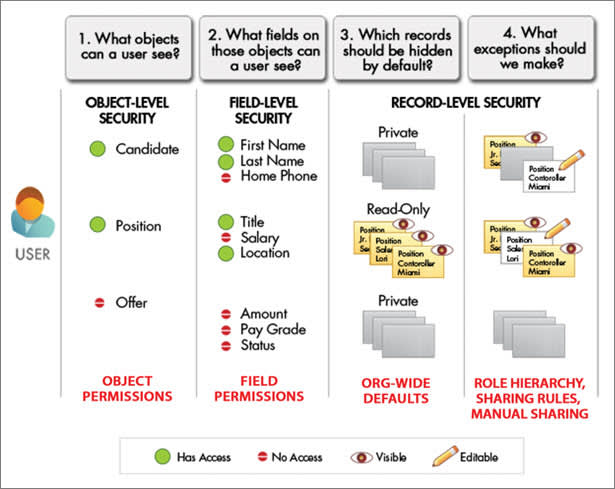
A diagram of the sharing and security settings available for different types of users

Although you can configure the security and sharing model entirely using the user interface, the model works at the API level. That means any permissions you specify apply even if you query or update the data via API calls. The security of your data is protected, regardless of how users get to it.


Tip

Make a table of the various types of users in your organization. In the table, specify the level of access to data that each type of user for each object and for fields and records within the object. You can then refer to this table as you set up your security model.

Levels of Data Access

You can control which users have access to which data in your whole org, a specific object, a specific field, or an individual record.
Organization
For your whole org, you can maintain a list of authorized users, set password policies, and limit logins to certain hours and locations.
Objects
Access to object-level data is the simplest thing to control. By setting permissions on a particular type of object, you can prevent a group of users from creating, viewing, editing, or deleting any records of that object. For example, you can use object permissions to ensure that interviewers can view positions and job applications but not edit or delete them.
Fields
You can restrict access to certain fields, even if a user has access to the object. For example, you can make the salary field in a position object invisible to interviewers but visible to hiring managers and recruiters.
Records
You can allow particular users to view an object, but then restrict the individual object records they're allowed to see. For example, an interviewer can see and edit her own reviews, but not the reviews of other interviewers. You can manage record-level access in these four ways.
  • Organization-wide defaults specify the default level of access users have to each others’ records. You use org-wide sharing settings to lock down your data to the most restrictive level, and then use the other record-level security and sharing tools to selectively give access to other users.
  • Role hierarchies give access for users higher in the hierarchy to all records owned by users below them in the hierarchy. Role hierarchies don’t have to match your organization chart exactly. Instead, each role in the hierarchy should represent a level of data access that a user or group of users needs.
  • Sharing rules are automatic exceptions to organization-wide defaults for particular groups of users, so they can get to records they don’t own or can’t normally see. Sharing rules, like role hierarchies, are only used to give additional users access to records. They can’t be stricter than your organization-wide default settings.
  • Manual sharing allows owners of particular records to share them with other users. Although manual sharing isn’t automated like org-wide sharing settings, role hierarchies, or sharing rules, it can be useful in some situations, such as when a recruiter going on vacation needs to temporarily assign ownership of a job application to someone else.

Audit System Use

Auditing provides important information for diagnosing potential security issues or dealing with real ones. Someone in your organization should audit regularly to detect potential abuse. Look for unexpected changes or patterns of use.
Record Modification Fields
All objects include fields to store the name of the user who created the record and who last modified the record. This provides some basic auditing information.
Login History
You can review a list of successful and failed login attempts for the past six months. For more information, see Monitor Login History.
Field History Tracking
You can turn on auditing to automatically track changes in the values of individual fields. Although field-level auditing is available for all custom objects, only some standard objects allow it. For more information, see Field History Tracking.
Setup Audit Trail
The Setup Audit Trail logs when modifications are made to your organization’s configuration. For more information, see Monitor Setup Changes.
https://trailhead.salesforce.com/content/learn/modules/data_security/data_security_sharing_rules
  • Use sharing rules to extend access beyond the role hierarchy structure.
  • Create a public group that includes users with different profiles and roles.
Before creating a sharing rule, it’s important to set up the appropriate public group. A public group is a collection of individual users, other groups, individual roles or territories, and/or roles or territories with their subordinates that all have a function in common. For example, users with the Recruiter profile as well as users in the SW Dev Manager role both review job applications.

Soft Skills is Paramount for Successful Manager

To an engineering manager, the term “career development” is almost always associated with furthering your technical competency through conferences, workshops, and classes. But while improving technical skill sets in the tech industry is hugely important, improving your soft skills is equally as crucial.
Often in technology, industry soft skills are not an emphasized part of career development. However, it is often the soft skills that managers have (or don’t have) that tend to make (or break) a team. As a manager, your main focus is to keep your team as productive and happy as they can be. Your mission is to motivate your team, support them on complex and high level technical vision/architecture, and back them up during technical reviews.
Whether you’re preparing for a role as an engineering manager or looking to become a better engineering manager, you should use these soft and hard skill questions as a guide to be more effective and help your team.
Soft Skills
  1. What soft skills are your strongest?
    It’s important to recognize where your strengths lie and use them to your advantage as you hone your skills that need improvement.
  2. What soft skills would most benefit your team?
    Having an external reason or motivation for strengthening a skill makes it easier to dedicate time to improving it.
  3. Are there common themes in the feedback you’ve received in past reviews and positions?Common threads can you point towards a skill that you already know needs improvement.
  4. What interactions make you uncomfortable in your current position?Improving your ability to handle difficult situations in your current position (e.g. mediating conflict, providing praise, handling criticism) is an area where you can see immediate results.
  5. Have you asked your team for feedback on your performance?
    Often, feedback is from managers to individual contributors, but having an upward route for feedback will help both you and your team.
Once you’ve identified the areas you’d like to improve on, begin reading articles or books about these areas, such as having difficult conversations or being a good listener. Most importantly, practice implementing these skills and reflect on what aspects are working and what aren’t to continue tweaking and improving yourself. When your team recognizes you’re working to improve your own soft skills, they will recognize the qualities and skills you already bring to the team.
Hard Skills
  1. How are you tracking your team’s progress?
    Make sure your method of tracking aligns with how your company measure and defines success (e.g. completing sprints, meeting milestones, customer satisfaction, and budget).
  2. Have you made a technical roadmap for your project and team?A technical roadmap provides concrete direction for your team that can be referred to as often as necessary.
  3. Do you have the materials necessary for growing your team ready?Clear, updated, and readily available onboarding material is often an oversight that can easily be avoided and makes adding a new teammate a more seamless process.
  4. Are there technical areas your team lacks expertise in?Providing training for your employees or using internal knowledge sharing to your advantage can help save your team time, money, and headaches.
  5. Are there new skills you’ve been interested and excited to learn more about?
    Don’t forget about yourself and what made you an engineer in the first place.
The hard skills of an engineering manager differ from the hard skills of an engineer. While an engineer’s hard skills are focused on product development (software languages, PCB layout tools, etc.), a manager’s hard skills are focused on ensuring the team has the time, budget, and resources they need to successfully create a product.
It’s important to learn new capabilities when making the move to a management position, such as Agile Development and the tracking tools your organization uses for program management (e.g. Atlassian Tools and Microsoft Project).
Once you have identified hard skills that could help you and your team, begin looking internally: Who are the subject matter experts at your organization? What yearly or quarterly trainings are available? Does your organization sponsor trips to conferences?
And externally: What workshops are being offered in your area? Is there a conference or local meetup where you could get more support and ideas?
Successful engineering management is difficult because it requires the right hybrid of both hard and soft skills. You will always have skill sets to improve in order to be the most effective manager for your team. If you’re dedicated to continually assessing and developing those skills, your team will thank you for it.

Managing a Remote and OnPremise Team

Remote work has been, and continues to be, on the rise. Nearly 43% of Americans report working remotely at least some of the time. There are many reasons for this: improved telecommunications, improved productivity, increased happiness, increased value, a lighter environmental footprint, and an increase in overall profitability (to name a few).   
We won’t go into too much detail on the why here, because this is about the how. We know more and more people want to work remotely, so the question is how to manage these teams to make the most out of the benefits of remote work while avoiding some of the risks.
Not surprisingly, a lot of these tips simply follow best practices of running effective engineering teams. We’ve just applied the same concepts to working outside of the office, and with special attention focused on what gets overlooked by not being in the same room:
  • Vision and Motivation
  • Clear Expectations and Process
  • Team Culture

Vision and Motivation

All-star teams are made up people who are individually motivated to drive toward a common vision. At the highest level, everyone must know why they are doing what they’re doing.
  1. Have your team come up with either an overall mission statement or project-specific mission statement that everyone can buy into.
  2. Video conference once a week with each member of your team. Familiarize yourself with what motivates each person individually.
Some common motivators may include:
  • The vision: some people really just buy in and that’s all they need.
  • The code: Github as heaven.
  • The challenge: figuring out difficult problems is all they want to do all day.
  • The prestige: people want props when props are due. No shame in that!
  • The team: being part of something bigger than themselves.
  • The career: where do they want to be in 5 years?
  • The money: pure and simple.
  • Lead by example. If you aren’t dedicated, why should they be?

Clear Expectations and Process

Once you have a team of employees individually motivated toward a common goal, you need to enable and empower the team to achieve it. How do you do this?
  • Set clear expectations. When employees have clear expectations, they are more effectively able to self-manage. They know what success looks like and if they’ve missed targets.
  • Find the process “sweet spot.” This is a matter of communicating with your team. Hold regular monthly or bi-weekly team video conferences. Come up with the right process together that meets the needs of the project while staying unburdensome to your team. Perhaps most importantly, always be reviewing the processes with your team, and be willing to adjust and improve based on feedback.
There are a few recurring events that every leader should consider setting up in their teams:
  • Daily status update via chat: A message (on a platform like Slack) from every employee every morning. Very quick notes of what they worked on yesterday, what they will do today, what risks they see, and if they are blocked by anything. This is a really low effort way to identify risks and roadblocks early on.
  • Have a weekly “coffee”: A 30-minute video conference with each team member to check in on their motivation and their understanding/performance against expectations. Create development plans for growth or just talk about whatever is on their minds.
  • Monthly or bi-weekly team meetings: The team needs a forum in which they can interact with each other, give shout-outs, and understand the state of the business and various projects.
  • Focused work time: one or more long blocks of time per week that your teams are protected from any meeting or distractions besides focused work.

Team Culture

The biggest loss when a team is remote is the loss of comradery and bonding that can really only be created by being in the same room day in and day out. Unfortunately, having a great team culture is also one of the best ways to get the most out of a group.
That being said, there are ways to bolster team unity even when some or all employees are working from afar:
  • Make sure every member of the team knows the names and some information about everyone else. Make sure new members are properly introduced to the rest of the team.
  • Mentorships or partnerships can greatly increase the sense of community and help solve problems. If you have multiple projects, create pairs out of one person from each project and encourage them to discuss their issues/wins with each other.
  • Hold team meetings that are centered around culture, fun, and vision-building. If you do demos, shoutouts, or rewards of any kind it should be done with the whole team available to participate.
  • Create a “random” channel in your Slack. Some of the funniest culture-driving conversations come directly through this so-called “unimportant” channel.
Following these helpful tidbits will allow your remote team to thrive even beyond what can be expected of in-house staff. They will be happier and work better, which allows you — as their fearless leader — to enjoy the pride of having an all-star all-remote team.